INode
Each
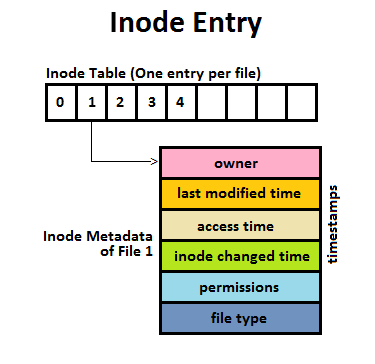
inodestores the attributes and disk block locations of the object’s data. POSIX per-file system unique identifier for a file (each drive being an independant filesystem) - wikipedia / File System Continued
# inode ⮺
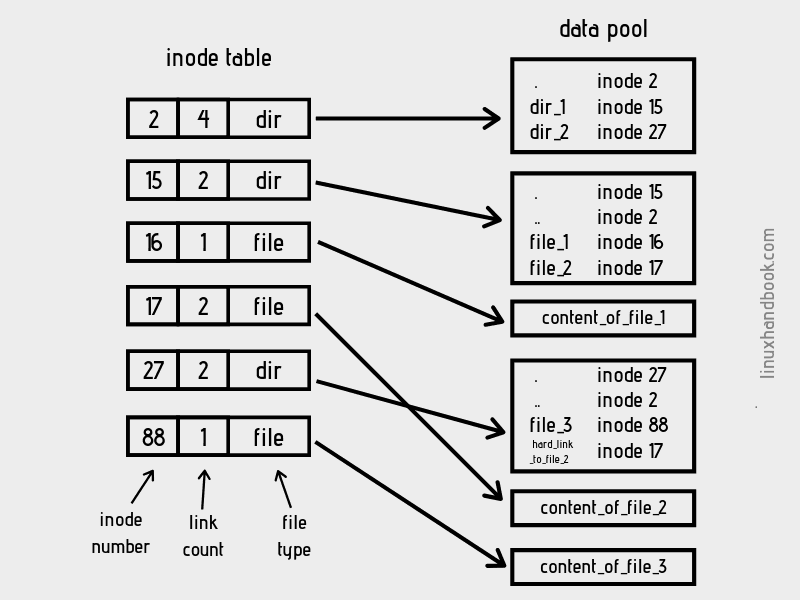
Inode holds metadata and technical information, but does not contain the filename. The filename is hold as part as each directory entry.
- inode number
- inode block group - inode are store within a group, indexed by inode number → block group + inode index within that group
- inode generation - allows to reuse deleted inode and detect that they don’t reference the same file as previously
- inode bitmap - indicates which entries are free/in use inside a block group
Filesystem
│
├── Block group 0loc
│   ├── inode bitmap
│   └── inode table
│       ├── inode #...
│       ├── inode #...
│       └── ...
│
├── Block group 1
│   ├── inode bitmap
│   └── inode table
│
└── ...
# Hardlink
Allows to share content + metadata except the name which may differ. hardlink cannot link to directory => This would cause a loop in the filesystem and that’s why it’s prohibited by the filesystem
$ find . -inum 1234# Symlink ⮺
In Linux, a symlink (symbolic link) itself is a separate file, and it has its own metadata, independent of the target file.
Metadata Stored on a Symlink (Independent of Target)
- File Type: symlink
- Ownership (User and Group): A symlink has its own owner (UID) and group (GID).
- Timestamps
- Size: The size of a symlink is the length of the path it stores
What Metadata is NOT Stored in a Symlink?
- File content
- target file permission
- target file size