
# Raspberry Pi / ARM Fleet 🫐
The Raspberry Pi is a tiny and affordable computer that you can use to learn programming through fun, practical projects. - raspberrypi.org / r/raspberry_pi
see also

# Fleet ⮺
Checking Model version cat /proc/device-tree/model
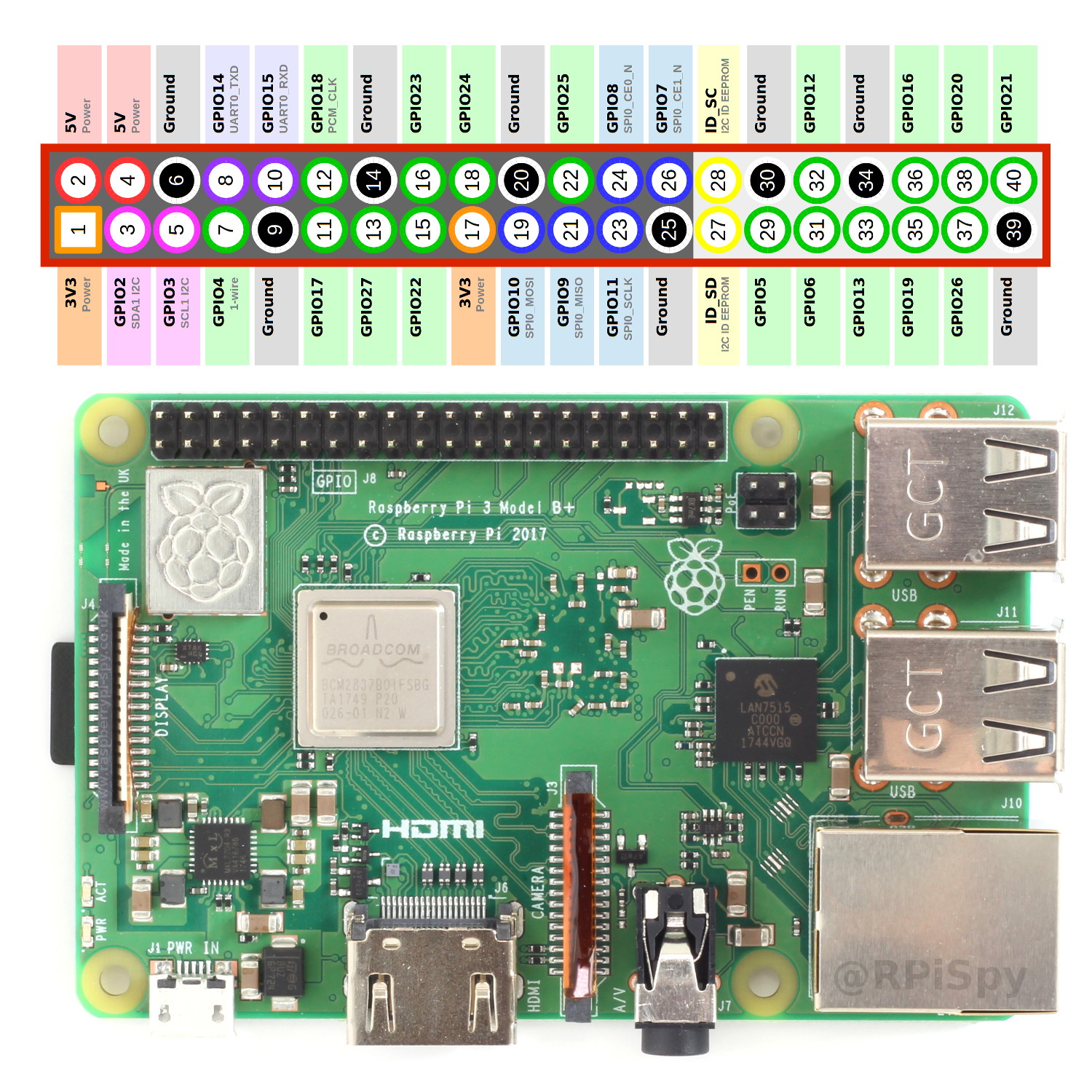
or pinout in new raspbian version
| Device | Hostname / Alias | Architecture | RAM | Year | Compute Power* | Notes |
|---|---|---|---|---|---|---|
| Raspberry Pi 5 Model B Rev 1.0 | ARM Cortex-A76 (ARMv8-A, 64-bit, quad-core) | 8GB | 2026 | ~15–20× | ||
| BananaPi M2 Zero | The100 | ARM Cortex-A7 | 0.5Go | 2024 | ~1.5× | |
| Raspberry Pi 4 Model B Rev 1.2 | ender6 | ARM Cortex-A72 (ARMv8-A, 64-bit, quad-core) | 4Go | 2021 | ~8–10× | |
| Raspberry Pi 3 Model B Rev 1.2 | ender3 | ARM Cortex-A53 (ARMv8-A, 64-bit, quad-core) | 1Go | 2019 | ~4–5× | |
| Raspberry Pi 1 Model B Rev 2 | ARM1176JZF-S (ARMv6, 32-bit, single-core) | 0.5Go | 2013 | 1× | Raspi-OS | |
| CubieTruck (Cubieboard3) | Allwinner A20 (dual Cortex-A7) | 2Go | 2013 | ~2× |
*Compute power is a rough relative CPU estimate (multi-core + IPC + clock improvements), not a benchmark score. It is useful for quickly judging things like Kubernetes nodes, Docker workloads, CI runners, or lightweight servers.
# GPIO
# USB
# Finding Serial ports ⮺
ls /dev/serial/by-id/*-> this is stablelsusb-> USB-Serial adapterdmesg | grep -i serial-> 3f201000.serial: ttyAMA0- What is the difference between ttys0, ttyUSB0 and ttyAMA0?
- ttyAMA0 is the device for the first serial port on ARM architecture. ttyAMA0 can be the Tx, Rx pins for the Raspberry. But for the Raspberry Pi 3b it was used for the Bluetooth.
- ttyUSB0 is the device for the first USB serial convertor.
WARNING - /dev/serial/by-id missing
- edit /usr/lib/udev/rules.d/60-serial.rules
# turn off USB ports power ⮺
hub-ctrl.c/hub-ctrl -h 0 -P 2 -p 0 turn off the power to the all the usb ports
# Temperature Check ⮺ 🌡
$ vcgencmd measure_temp# Wifi ⮺
# see also
Written on October 30, 2020, Last update on June 29, 2026
raspberry-pi
arm-hardware